Functions and Simulink models
Functions
Pre-simulation
- initAllStructs(model, base_windspeed, constr, ENVMT, Lbooth, loiterStates, DE2019, simInit, T, winchParameter, params, act)
Initialise simulation input variable.
- Parameters:
model – simulink model name (without .slx extension).
base_windspeed – Wind speed at max altitude where speed stays constant.
constr – Aircraft manoeuvre and winch constraints.
ENVMT – Environmental parameters.
Lbooth – Flight path parameters.
loiterStates – Initial loiter parameters (power cycle initialisation).
DE2019 – Aircraft parameters.
simInit – Simulation initialisation parameters.
T – Tether dimensions and material properties.
winchParameter – Winch dynamic parameters.
params – Flight/Winch controller parameters.
act – Actuator, aileron elevator and rudder data.
- Returns:
simIn - Simulation input variable containing all parameters needed by simulink.
- Example:
- simIn = initAllStructs(‘Dyn_6DoF_v2_0_r2019b’, base_windspeed, constr, …ENVMT, Lbooth, loiterStates, DE2019, simInit, T, winchParameter,params,act)
Other m-files required: transformFromWtoO.m, transformFromOtoW.m, getPointOnBooth.mSubfunctions: NoneMAT-files required: Lib/Common/DE2019_params.mat, Lib/6DoF/Control_allocation_V60.mat, Lib/Common/winddata_Lidar_Avg.mat- Revision:
22-June-2021
- Author:
Dylan Eijkelhof (d.eijkelhof@tudelft.nl)
- initAllSimParams_DE2019(Kite_DOF)
Initialise simulation parameters for the complete system
- Parameters:
Kite_DOF – Degrees of freedom of the kite (3 or 6)
- Returns:
act - Actuator, aileron elevator and rudder data
base_windspeed - Wind speed at max altitude where speed stays constant
constr - Aircraft manoeuvre and winch constraints
ENVMT - Environmental parameters
Lbooth - Flight path parameters
loiterStates - Initial loiter parameters (power cycle initialisation)
DE2019 - Aircraft parameters
simInit - Simulation initialisation parameters
T - Tether dimensions and material properties
winchParameter - Winch dynamic parameters
params - Flight/Winch controller parameters
- Example:
- [act, base_windspeed, constr, ENVMT, Lbooth, …loiterStates, DE2019, simInit, T, winchParameter,params] = initAllSimParams_DE2019()
Other m-files required: transformFromWtoO.m, transformFromOtoW.m, getPointOnBooth.mSubfunctions: NoneMAT-files required: Lib/Common/DE2019_params.mat, Lib/6DoF/Control_allocation_V60.mat, Lib/Common/winddata_Lidar_Avg.mat- Revision:
22-June-2021
- Author:
Dylan Eijkelhof (d.eijkelhof@tudelft.nl)
- Get_simulation_params(windspeed, Kite_DOF)
Initialise simulation parameters for the complete system and set optimised parameters
- Parameters:
windspeed – Wind speed at which the parameters should be read
Kite_DOF – Degrees of freedom of the kite (3 or 6)
- Returns:
act - Actuator, aileron elevator and rudder data
base_windspeed - Wind speed at max altitude where speed stays constant
constr - Aircraft manoeuvre and winch constraints
ENVMT - Environmental parameters
Lbooth - Flight path parameters
loiterStates - Initial loiter parameters (power cycle initialisation)
DE2019 - Aircraft parameters
simInit - Simulation initialisation parameters
T - Tether dimensions and material properties
winchParameter - Winch dynamic parameters
params - Flight/Winch controller parameters
- Example:
- [act, base_windspeed, constr, DE2019, ENVMT, Lbooth, …loiterStates, params, simInit, T, winchParameter] = …get_simulation_params(22, 6)
Other m-files required: initAllSimParams_DE2019.mSubfunctions: NoneMAT-files required: None- Revision:
17-March-2021
- Author:
Dylan Eijkelhof (d.eijkelhof@tudelft.nl)
- PreSim_startup()
Set search path, simulink cache folder and clear variables
- Returns:
None
- Example:
PreSim_startup();
Other m-files required: NoneSubfunctions: NoneMAT-files required: None- Revision:
17-September-2020
- Author:
Dylan Eijkelhof (d.eijkelhof@tudelft.nl)
Post-simulation & Extra’s
- animation_simtime(Path_last_cycle, pos, index_set, Tend, fps, t)
Animate timer according to datapoint time
- Parameters:
Path_last_cycle – Aircraft position
Pos – timer position on figure
index_set – Array containing the indices of the dataset that should be used
Tend – Video length
fps – Frames per second
t – animation time at particular step, provided by fanimator()
- Returns:
handleTime - Textbox with simulation time plot handle
- Example:
- TimePos = [0.6*limitx(2), limity(2), limitz(2)];fanimator(axes1,@animation_simtime,Path_last_cycle,TimePos,index_set,Tend,…fps,t,’AnimationRange’,[0 Tend],’FrameRate’,fps)
Other m-files required: NoneSubfunctions: NoneMAT-files required: None- Revision:
17-September-2020
- Author:
Dylan Eijkelhof (d.eijkelhof@tudelft.nl)
- animate_flightpath(FileName, P_mech_last_cycle, Path_last_cycle, EulAng_last_cycle, Tether_last_cycle_x, Tether_last_cycle_y, Tether_last_cycle_z, ENVMT, Wingspan, Tend, fps)
Create flight path animation
- Parameters:
FileName – Name of the video file, including extension, If [] is provided, no video file is created.
P_mech_last_cycle – Instantaneous power.
Path_last_cycle – Aircraft position.
EulAng_last_cycle – Aircraft orientation angles.
Tether_last_cycle_x – Tether particle x positions.
Tether_last_cycle_y – Tether particle y positions.
Tether_last_cycle_z – Tether particle z positions.
ENVMT – Environment data for wind direction.
Wingspan – Kite wing span.
Tend – Video length.
fps – Video frames per second.
- Returns:
noVar - Video file
FileName - The video file name (if created) else empty array
- Example:
- animate_flightpath_torque(‘test.mp4’,P_mech_last_cycle,…Path_last_cycle,EulAng_last_cycle,Tether_last_cycle_x,…Tether_last_cycle_y,Tether_last_cycle_z,ENVMT,45,30);animate_flightpath_torque([],P_mech_last_cycle,…Path_last_cycle,EulAng_last_cycle,Tether_last_cycle_x,…Tether_last_cycle_y,Tether_last_cycle_z,ENVMT,45,30);
Other m-files required: animation_aircraft.m, animation_tether.m, animation_simtime.m, animation_colorbar.mSubfunctions: NoneMAT-files required: None- Revision:
28-September-2020
- Author:
Dylan Eijkelhof (d.eijkelhof@tudelft.nl)
- animation_aircraft(Path_last_cycle, EulAng_last_cycle, windDir, index_set, scale, Tend, fps, t)
Animate aircraft position
- Parameters:
Path_last_cycle – Aircraft position
EulAng_last_cycle – Aircraft orientation angles
windDir – Wind direction
index_set – Array containing the indices of the dataset that should be used
scale – Aircraft illustration scale (actual scale/1.2886)
Tend – Video length
fps – Frames per second
t – animation time at particular step, provided by fanimator()
- Returns:
p - Aircraft plot handle
- Example:
- fanimator(axes1,@animation_aircraft,Path_last_cycle,EulAng_last_cycle,…ENVMT.windDirection_rad,Tend,fps,t,’AnimationRange’,[0 Tend],’FrameRate’,fps)
Other m-files required: NoneSubfunctions (bottom): drawVehicleBody2, rotate_PhiThetaPsi, translate_3DMAT-files required: plane_image.mat- Revision:
17-September-2020
- Author:
Dylan Eijkelhof (d.eijkelhof@tudelft.nl)
- Update_previous_version
Copyright 2020 Delft University of Technology
Licensed under the Apache License, Version 2.0 (the “License”); you may not use this file except in compliance with the License. You may obtain a copy of the License at
Unless required by applicable law or agreed to in writing, software distributed under the License is distributed on an “AS IS” BASIS, WITHOUT WARRANTIES OR CONDITIONS OF ANY KIND, either express or implied. See the License for the specific language governing permissions and limitations under the License.
- Video_from_simOut(filename, simOut, simInit, ENVMT, DE2019, duration)
Create an animation object or video from sim output
- Parameters:
filename – Name of the video file, including extension If [] is provided, no video file is created
simOut – Simulink simulation output
simInit – Simulation initialisation parameters
ENVMT – Environmental parameters
DE2019 – Aircraft parameters
duration – Length of video in seconds, it influences the number of datapoints to include
- Returns:
noVar - Video file
- Example:
- Video_from_simOut(‘test.mp4’, simOut,simInit,ENVMT,DE2019,30)Video_from_simOut([], simOut,simInit,ENVMT,DE2019,30)
Other m-files required: animate_flightpath.m, extractSignalOfLastCycle2.m, extractSignalOfLastCycle3D.m, extractSignalOfLastCycle_nD.mSubfunctions: NoneMAT-files required: None- Revision:
16-March-2021
- Author:
Dylan Eijkelhof (d.eijkelhof@tudelft.nl)
- exportToPreviousVersion(ModelName, Version)
Given simulink model is exported to a previous version.
- If the model contains referenced models (separate .slx files)
these files are also tracked and exported to older versions. The Main simulink model is then adapted to refer to the files compatible in the same version.
- Parameters:
ModelName – Original model name
Version – Matlab version to export to
- Returns:
Simulink model exported to given version
- Example:
exportToPreviousVersion(‘Dyn_PointMass_r2019b’,’R2015B’)
Other m-files required: NoneSubfunctions: NoneMAT-files required: None- Revision:
28-September-2020
- Author:
Dylan Eijkelhof (d.eijkelhof@tudelft.nl)
- animation_colorbar(Power, index_set, Tend, fps, t)
Animate instantaneous power on colorbar
- Parameters:
Path_last_cycle – Aircraft position
index_set – Array containing the indices of the dataset that should be used
Tend – Video length
fps – Frames per second
t – animation time at particular step, provided by fanimator()
- Returns:
handleLine - Line moving over colorbar plot handle
- Example:
- h_axes = axes(‘Parent’,fig_pow,’position’, cb.Position, ‘ylim’, …cb.Limits, ‘color’, ‘none’, ‘visible’,’off’);fanimator(h_axes,@animation_colorbar,Power,Tend,…fps,t,’AnimationRange’,[0 Tend],’FrameRate’,fps)
Other m-files required: NoneSubfunctions: NoneMAT-files required: None- Revision:
17-September-2020
- Author:
Dylan Eijkelhof (d.eijkelhof@tudelft.nl)
- animation_tether(Path_last_cycle, tether_last_cycle, index_set, Tend, fps, t)
Animate tether shape
- Parameters:
Path_last_cycle – Aircraft position
tether_last_cycle – Tether particle xyz positions
index_set – Array containing the indices of the dataset that should be used
Tend – Video length
fps – Frames per second
t – animation time at particular step, provided by fanimator()
- Returns:
handleParticles - Tether plot handle
- Example:
- fanimator(axes1,@animation_tether,Path_last_cycle,Tether_last_cycle,Tend,…fps,t,’AnimationRange’,[0 Tend],’FrameRate’,fps)
Other m-files required: NoneSubfunctions (bottom): drawParticleTetherMAT-files required: None- Revision:
17-September-2020
- Author:
Dylan Eijkelhof (d.eijkelhof@tudelft.nl)
Main simulink model
The following image shows the root level of the simulink model. This shows how the different modules work together. This level is similar for both 3DoF and 6DoF simulations.

Simulink parts
Environment
The following image shows the environment subsystem of the simulink model. This subsystem is similar for both 3DoF and 6DoF simulations. It is used to determine the wind speed at each tether particle and at the kite.

Flight controller
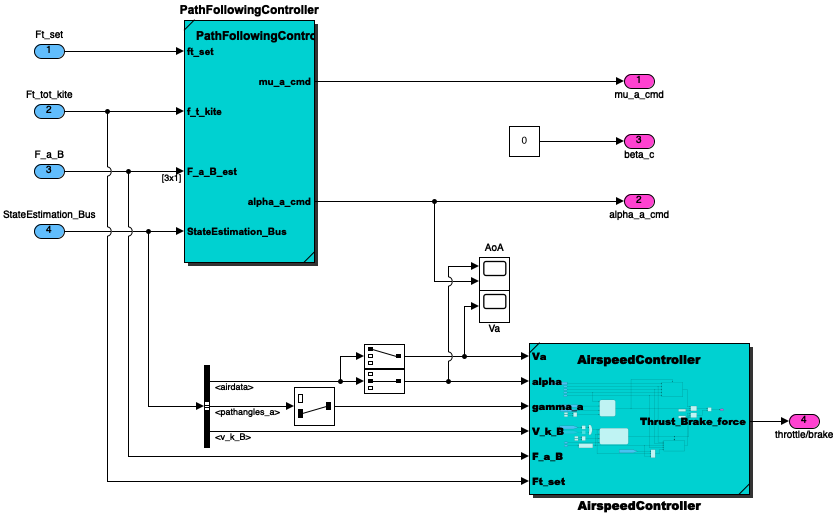
The following image shows the root level of the flight controller in the case of a 3DoF simulation.
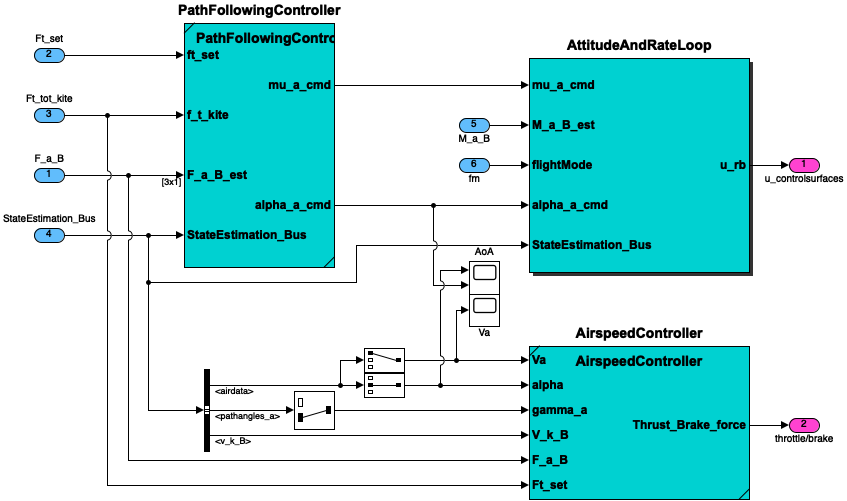
The following image shows the root level of the flight controller in the case of a 6DoF simulation.
Flightpaths
These functions are called by the PathFollowingController. Not all required functions are shown here. Some functions are only documented inside simulink.
- transformFromAtoB(alpha, beta, vec_A)
This function transforms a vector between aerodynamic reference frame and body reference frame.
- Parameters:
alpha – Pitch angle.
beta – Yaw angle.
vec_A – Vector in aerodynamic reference frame.
- Returns:
vec_B - Vector in body reference frame.
Other m-files required: noneSubfunctions: noneMAT-files required: none- Version:
1.0
- Author:
Sebastian Rapp
- transformFromAbar2B(mu_a, alpha, beta, vec_Abar)
This function transforms a vector between rotated aerodynamic reference frame and body reference frame.
- Parameters:
mu_a – Roll angle.
alpha – Pitch angle (Angle of Attack).
beta – Yaw angle.
vec_Abar – Vector in rotated aerodynamic reference frame.
- Returns:
vec_B - Vector in body reference frame.
Other m-files required: noneSubfunctions: noneMAT-files required: none- Version:
1.0
- Author:
Sebastian Rapp
- transformFromAbartoO(chi_a, gamma_a, vec_Abar)
This function transforms a vector between rotated aerodynamic reference frame and inertial reference frame.
- Parameters:
chi_a – Course angle.
gamma_a – Path angle.
vec_Abar – Vector in rotated aerodynamic reference frame.
- Returns:
vec_O - Vector in inertial reference frame.
Other m-files required: noneSubfunctions: noneMAT-files required: none- Version:
1.0
- Author:
Sebastian Rapp
- transformFromTautoW(long, lat, vec_tau)
This function transforms a vector in the tangential plane to the wind reference frame.
- Parameters:
long – Longtitude position of the kite.
lat – Latitude position of the kite.
vec_tau – Vector in the tangential plane.
- Returns:
vec_W - Vector in wind reference frame.
Other m-files required: noneSubfunctions: noneMAT-files required: none- Version:
1.0
- Author:
Sebastian Rapp
- calcCourse2ClosestPoint(p_VT_W, p_kite_W)
This function returns the desired course in the tangential plane.
- Parameters:
p_VT_W – An instance of this class.
p_kite_W – position of the kite in wind reference frame.
- Returns:
chi_K_des - the desired course
bearing_vec_W - vector pointing to the desired point
bearing_sign - vector sign
Other m-files required: noneSubfunctions: noneMAT-files required: none- Version:
1.0
- Revision:
28.08.2017
- Author:
Sebastian Rapp
- wrapCourseError(chi_ref, chi)
Wrapping of course angle error
The vectors are laying in the tangential plane attached to the current position on the small earth.
Other m-files required: noneSubfunctions: noneMAT-files required: none- Version:
1.0
- Author:
Sebastian Rapp
- doRodriguesRotation(pos_W, p_target_W, v)
This function performs the Rodrigues Rotation on a vector
- Parameters:
pos_W – Kite position, used to define plane of rotation
p_target_W – Target position, used to define plane of rotation
v – Vector to rotate
- Returns:
vrot - Rotated vector
Other m-files required: noneSubfunctions: noneMAT-files required: none- Version:
1.0
- Author:
Sebastian Rapp
- getChiDotGammaDotOK(windDirection_rad, lat, long, v_k_W, chi_tau_dot, r, chi_k, gamma_k, v_ideal, pos_W, gamma_tau, gamma_tau_dot)
This function returns the time derivative of the course and path angles
- Parameters:
windDirection_rad – Angle between the wind reference frame and the inertial reference frame around the z-axis.
lat – Latitude position of the kite.
long – Longtitude position of the kite.
v_k_W – Kite velocity in wind reference frame.
chi_tau_dot – Time derivative of the course angle in the tangential plane.
r – Distance between kite and ground station.
chi_k – Course angle in kinetic reference frame.
gamma_k – Path angle in kinetic reference frame.
v_ideal – Total kinetic velocity in wind reference frame.
pos_W – Position of the kite in wind reference frame.
gamma_tau – Path angle in the tangential plane.
gamma_tau_dot – Time derivative of the path angle in the tangential plane.
- Returns:
chi_dot - Course rate
gamma_dot - Path rate
Other m-files required: transformFromWtoO.m, transformFromWtoTau.mSubfunctions: noneMAT-files required: none- Version:
1.0
- Revision:
28.08.2017
- Author:
Sebastian Rapp
- transformFromOtoAbar(chi_a, gamma_a, vec_O)
This function transforms a vector between inertial reference frame and rotated aerodynamic reference frame.
- Parameters:
chi_a – Course angle.
gamma_a – Path angle.
vec_O – Vector in inertial reference frame.
- Returns:
vec_Abar - Vector in rotated aerodynamic reference frame.
Other m-files required: noneSubfunctions: noneMAT-files required: none- Version:
1.0
- Author:
Sebastian Rapp
- transformFromBtoA(alpha, beta, vec_B)
This function transforms a vector between body reference frame and aerodynamic reference frame.
- Parameters:
alpha – Pitch angle.
beta – Yaw angle.
vec_B – Vector in body reference frame.
- Returns:
vec_A - Vector in aerodynamic reference frame.
Other m-files required: noneSubfunctions: noneMAT-files required: none- Version:
1.0
- Author:
Sebastian Rapp
- predictChiDotRequ(long, lat, v_w_vec, pos_W, p_C_W, t, DtDs, chi_parallel)
This function calculates the course rate in the tangential plane based on the path curvature
- Parameters:
long – Longtitude position of the kite.
lat – Latitude position of the kite.
v_w_vec – Kite velocity in wind reference frame.
pos_W – Position of the kite in wind reference frame.
p_C_W – Closest position on Lissajous figure.
t – Tangent at p_C_W.
DtDs – Derivative of the tangent with respect to the position on the Lissajous figure.
chi_parallel – Required course angle to reach p_C_W.
- Returns:
chi_tau_dot - Required course rate in the tangential plane
Other m-files required: transformFromWtoTau.m, doRodriguesRotation.mSubfunctions: noneMAT-files required: none- Version:
1.0
- Author:
Sebastian Rapp
- transformFromOtoW(windDirection_rad, vec_O)
This function transforms a vector between inertial reference frame and wind reference frame.
- Parameters:
windDirection_rad – Angle between the wind reference frame and the inertial reference frame around the z-axis.
vec_O – Vector in inertial reference frame.
- Returns:
vec_W - Vector in wind reference frame.
Other m-files required: noneSubfunctions: noneMAT-files required: none- Version:
1.0
- Author:
Sebastian Rapp
Note
Axis system is not only rotated around the z-axis but also also flipped upside down. \(Z_W = -Z_O\).
- transformFromBtoAbar(mu_a, alpha, beta, vec_B)
This function transforms a vector between body reference frame and aerodynamic reference frame.
- Parameters:
mu_a – Roll angle.
alpha – Pitch angle.
beta – Yaw angle.
vec_B – Vector in body reference frame.
- Returns:
vec_Abar - Vector in rotated aerodynamic reference frame.
Other m-files required: noneSubfunctions: noneMAT-files required: none- Version:
1.0
- Author:
Sebastian Rapp
- transformFromWtoO(windDirection_rad, vec_W)
This function transforms a vector between wind reference frame and inertial reference frame.
- Parameters:
windDirection_rad – Angle between the wind reference frame and the inertial reference frame around the z-axis.
vec_W – Vector in wind reference frame.
- Returns:
vec_O - Vector in inertial reference frame.
Other m-files required: noneSubfunctions: noneMAT-files required: none- Version:
1.0
- Author:
Sebastian Rapp
Note
Axis system is not only rotated around the z-axis but also also flipped upside down. \(Z_O = -Z_W\).
- transformFromWtoTau(long, lat, vec_W)
This function transforms a vector in the wind reference frame to the tangential plane.
- Parameters:
long – Longtitude position of the kite.
lat – Latitude position of the kite.
vec_W – Vector in wind reference frame.
- Returns:
vec_tau - Vector in the tangential plane.
Other m-files required: noneSubfunctions: noneMAT-files required: none- Version:
1.0
- Author:
Sebastian Rapp
- calculateCommandedCourse2(t, delta_vec, delta, delta0, chi_parallel, L_sol, pos_W, v_w_vec, chi_tau_is)
This function returns the desired course
check sign with curve frame - y component is negative in this frame - delta Chi is positive and vice versa. add a predictive part to smooth highly curved paths.
Other m-files required: wrapCourseError.mSubfunctions: noneMAT-files required: none- Version:
1.0
- Author:
Sebastian Rapp
- updateBoothLemniscate(l_tether, Lbooth)
This function scales the Lissajous figure by tether length
- Parameters:
l_tether – Current tether length.
Lbooth – Lissajous figure dimension parameter structure.
- Returns:
Lem - Scaled Lissajous figure dimension parameter structure.
Other m-files required: noneSubfunctions: noneMAT-files required: none- Version:
1.0
- Author:
Sebastian Rapp
- getPointOnBooth(a, b, phi, l_tether, s)
Calculate the tangent at path position s_old and its derivative.
- Parameters:
s_old – Old Lissajous path parameter s (0≤s≤2π)
Lbooth – Lissajous figure dimension parameter structure.
direction – Flight direction on Lissajous.
- Returns:
t - Tangent.
DtDs - Derivative of the tangent with respect to the position on the Lissajous figure.
L - Lemniscate of Booth
dLds - Derivative of the Lemniscate with respect to the position on the Lissajous figure.
q - Path in cartesian coordinates in the wind reference frame.
Other m-files required: updateBoothLemniscate.mSubfunctions: noneMAT-files required: none- Version:
1.0
- Author:
Sebastian Rapp
- doNewtonIterationBooth2(s_old, Lem, pos_W, direction)
This function performs a newton iteration to find the closest point on the Lissajous figure from the kite position.
- Parameters:
s_old – Old Lissajous path parameter s (0≤s≤2π)
Lem – Lissajous figure dimension parameter structure.
pos_W – Position of the kite in wind reference frame.
direction – Flight direction on Lissajous.
- Returns:
s_new - New Lissajous path parameter s (0≤s≤2π).
exceedMaxIter - Returns 1 when maximum number of iterations (10) is exceeded.
Other m-files required: getBoothInfos2.mSubfunctions: noneMAT-files required: none- Version:
1.0
- Author:
Sebastian Rapp
- getBoothInfos2(s_old, Lbooth, direction)
Calculate the tangent at path position s_old and its derivative.
- Parameters:
s_old – Old Lissajous path parameter s (0≤s≤2π)
Lbooth – Lissajous figure dimension parameter structure.
direction – Flight direction on Lissajous.
- Returns:
t - Tangent.
DtDs - Derivative of the tangent with respect to the position on the Lissajous figure.
L - Lemniscate of Booth
dLds - Derivative of the Lemniscate with respect to the position on the Lissajous figure.
q - Path in cartesian coordinates in the wind reference frame.
Other m-files required: noneSubfunctions: noneMAT-files required: none- Version:
1.0
- Author:
Sebastian Rapp
- getTargetOnBoothNewton2(Lem, p_kite_W, c0, l_tether, direction)
This function calculates the closest point on the Lissajous figure from the kite position by means of newton iterations.
- Parameters:
Lem – Lissajous figure dimension parameter structure.
p_kite_W – Kite position in wind reference frame.
c0 – Old Lissajous path parameter s (0≤s≤2π).
l_tether – Current tether length.
direction – Flight direction on Lissajous.
- Returns:
sol - New Lissajous path parameter s (0≤s≤2π).
p_C_W - Closest position on Lissajous figure in wind reference frame.
Other m-files required: doNewtonIterationBooth2.mSubfunctions: noneMAT-files required: none- Version:
1.0
- Author:
Sebastian Rapp
Ground station
The following image shows the ground station subsystem of the simulink model. This subsystem is similar for both 3DoF and 6DoF simulations. Unfortunately, no image can be included of the state machine, however this can be viewed inside simulink. Basically the state machine determines in what flight mode the kite needs to be and what the tether force set point is corresponding to that mode.

Tether dynamics
The functions are described inside simulink. The following image shows the what the inputs and outputs are of the tether module. This subsystem is similar for both 3DoF and 6DoF simulations.

Offline visualisation
These functions are used to visualise the simulation output. They can be called by the user for each parameter being logged by simulink. These is done outside of the simulation itself, hence the word offline.
- extractSignalOfLastCycle3D(signal, sample_count_last_cycle, simInit)
Extract 3D data from last converged power cycle.
- Parameters:
signal – Full 3D timeseries simulation output.
sample_count_last_cycle – Simulation timeseries ‘sample_count_last_cycle’.
simInit – Simulation input structure ‘simInit’.
- Returns:
y - Extracted power cycle 3D timeseries.
- Example:
Path_last_cycle = extractSignalOfLastCycle3D(pos_O, cycle_signal_counter, simInit );
Other m-files required: noneSubfunctions: noneMAT-files required: none- Revision:
May-2020
- Authors:
Sebastian Rapp, Dylan Eijkelhof (d.eijkelhof@tudelft.nl)
- Theoretical_Pcheck(simOut, constr, ENVMT, DE2019, simInit, T, params, fig_PO)
Theoretical check, add values to instantaneous power plot.
- Parameters:
simOut – Simulation output
constr – Aircraft manoeuvre and winch constraints
ENVMT – Environmental parameters
DE2019 – Aircraft parameters
simInit – Simulation initialisation parameters
T – Tether dimensions and material properties
params – Flight/Winch controller parameters
fig_PO – Instantaneous power figure (Offline_visualisation_power.m)
- Returns:
fig_PO - Instantaneous power plot of converged power cycle with theoretical power.
Other m-files required: Offline_visualisation_power.m(if fig_PO not given), extractSignalOfLastCycle_nD.mSubfunctions: noneMAT-files required: none- Revision:
14-April-2021
- Author:
Dylan Eijkelhof (d.eijkelhof@tudelft.nl)
Note
Loyd peak power with cosine losses from cycle CL and CD,
Costello et al. average power from cycle CL and CD
- enhance_plot(fontname, fontsize, linewid, markersiz, lgd)
- Function to enhance MATLAB’s lousy text choices on plots. Sets the
current figure’s Xlabel, Ylabel, Title, and all Text on plots, plus the axes-labels to the “fontname” and “fontsize” input here where the defaults have been set to ‘times’ and 16. Also sets all plotted lines to “linewid” and all markers to size “markersiz”. The defaults are 2 and 8.
- Parameters:
fontname – (Optional,DEF=’TIMES’) FontName string to use MATLAB’s ugly default is ‘Helvetica’
fontsize – (Optional,DEF=16) FontSize integer to use MATLAB’s tiny default is 10
linewid – (Optional,DEF=2) LineWidth integer to use MATLAB’s skinny default is 0.5
markersiz – (Optional,DEF=8) MarkerSize integer to use MATLAB’s squinty default is 6
lgd –
(Optional, DEF=0)
if is 0, doesn’t change the legend
if is 1, changes only the lines on the legend
if is 2, changes both the lines and the text
if is 3, changes only the text for all inputs,
if pass 0, use default
if pass -1, use MATLAB’s default
- Returns:
vec_Abar - Vector in rotated aerodynamic reference frame.
Modifications19-Feb-2002 J. Nelson - added linewid and markersiz to help squinting readers20-Feb-2002 J. Nelson - added check for legend. If legend exists, increase the line and marker size, also increase the font to fontsize-2 (2 points smaller than title and labels)25-Feb-2002 J. Nelson - added lgd (legend) input check to fix legend problems.
- extractSignalOfLastCycle_nD(signal, sample_count_last_cycle, simInit)
Extract n-D data from last converged power cycle.
- Parameters:
signal – Full n-D timeseries simulation output,size= nx1xtimeseries
sample_count_last_cycle – Simulation timeseries ‘sample_count_last_cycle’
simInit – Simulation input structure ‘simInit’
- Returns:
y - Extracted power cycle n-D timeseries.
- Example:
TetherX_last_cycle = extractSignalOfLastCycle_nD(Tether_x, cycle_signal_counter, simInit );
Other m-files required: noneSubfunctions: noneMAT-files required: none- Revision:
January-2021
- Author:
Dylan Eijkelhof (d.eijkelhof@tudelft.nl)
- Offline_visualisation_power(P_mech_last_cycle, Path_last_cycle)
Plot power curve and flight path
- Parameters:
P_mech_last_cycle – Converged cycle timeseries of power
Path_last_cycle – Converged cycle timeseries of kite position
- Returns:
None
- Example:
Offline_visualisation(P_mech_last_cycle,Path_last_cycle);
Other m-files required: enhance_plot.mSubfunctions: noneMAT-files required: none- Revision:
01-September-2020
- Author:
Dylan Eijkelhof (d.eijkelhof@tudelft.nl)
- extractSignalOfLastCycle2(signal, sample_count_last_cycle, simInit)
Extract 1D data from last converged power cycle.
- Parameters:
signal – Full 1D timeseries simulation output.
sample_count_last_cycle – Simulation timeseries ‘sample_count_last_cycle’.
simInit – Simulation input structure ‘simInit’.
- Returns:
y - Extracted power cycle 1D timeseries.
- Example:
P_mech_last_cycle = extractSignalOfLastCycle2(P_mech, cycle_signal_counter, simInit);
Other m-files required: noneSubfunctions: noneMAT-files required: none- Revision:
December-2019
- Authors:
Sebastian Rapp, Dylan Eijkelhof (d.eijkelhof@tudelft.nl)